Business Strategy
What Is a Hybrid Software Strategy? Buying the Commodity, Building the Differentiator
A hybrid software strategy lets you keep the proven tools you already pay for and build only the piece that makes you different.
Hybrid means buy the commodity, build the differentiator, and connect them on purpose.
What if your software is both helping you grow and quietly holding you back at the same time?
That tension is exactly why growing companies from the Loop to the industrial corridors near O'Hare are rethinking how they buy and build. A hybrid software strategy lets you keep the proven tools you already pay for and build only the piece that makes you different. You get speed without giving up your edge.
At Delta Technologies we see this every week. A team outgrows spreadsheets and random SaaS, leadership loses visibility right when decisions matter most, and the fix is not another platform. The fix is one operating system that connects what you already own to what only you need.
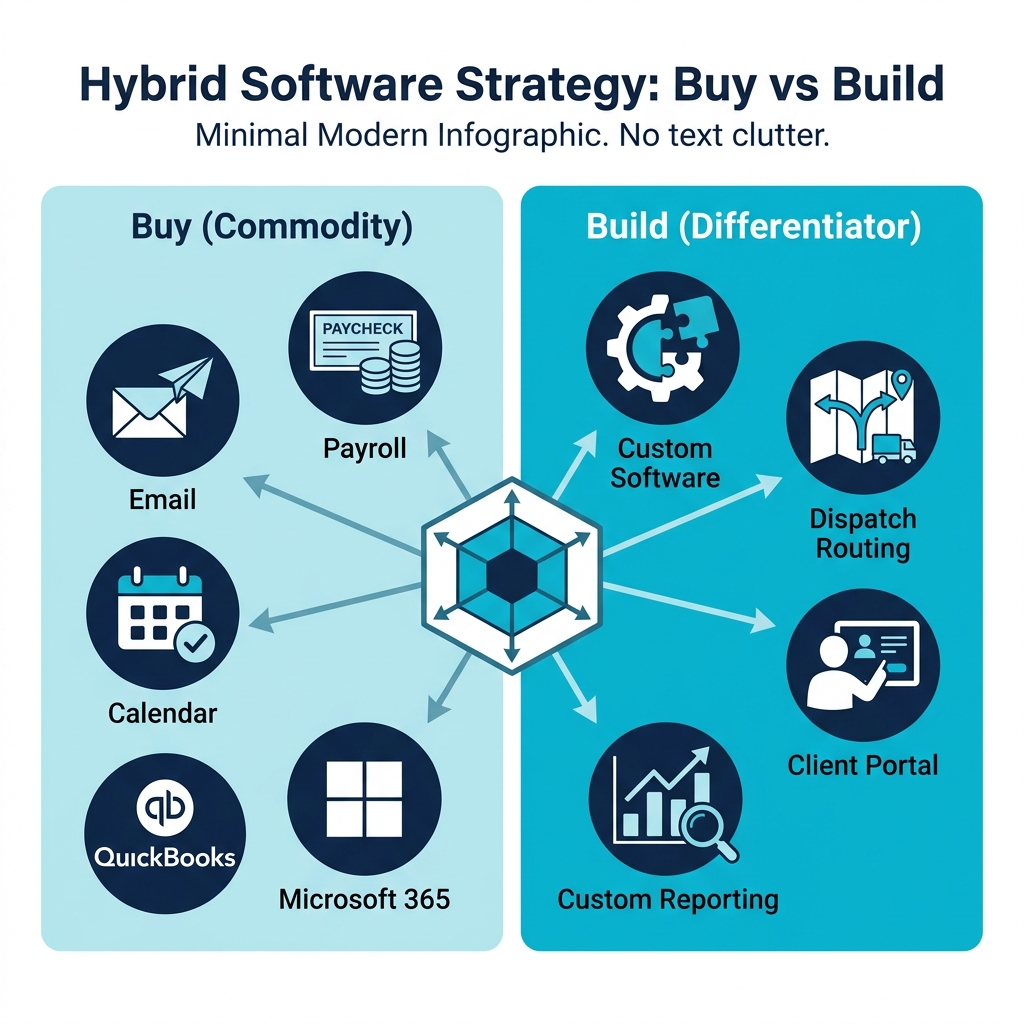
Hybrid means buy the commodity, build the differentiator, and connect them on purpose.
What Is a Hybrid Approach to Software Development?
A hybrid approach to software development blends off-the-shelf software with custom-built software in one stack. You buy ready-made products for generic work, and you build custom apps for the workflows that create margin, speed, or a moat.
This is different from all buy or all build. All buy forces your team to change how you work to fit the tool. All build burns time rebuilding email, payroll, and accounting that already exist. Hybrid gives you the best of breed software where it fits and a proprietary layer where it counts.
Gartner reports that 98 percent of enterprises use or are planning to use internal APIs, up from 88 percent in 2019. That shift is the backbone of hybrids. APIs let different systems talk so you can keep what works and extend what matters.
Hybrid is not a compromise. It is a deliberate architecture.
Should a Company Buy or Build Software
The classic question never goes away. Should a company buy or build software? The answer in 2026 is both, but for different reasons.
Retool's 2026 Build vs. Buy Report found that 35 percent of teams have already replaced at least one SaaS tool with a custom build and 78 percent expect to build more custom internal tools in 2026. McKinsey's State of AI 2026 survey found that 32 percent of organizations decided against buying at least one software product because AI coding tools let them build it in house.
That does not mean buying is dead. It means the bar for what you should buy versus what you should build has moved. If a function is the same in every company, buying wins. If a function is how you win deals, keep customers, or move faster than competitors near Millennium Park or Navy Pier, building wins.
We coach Chicago operators to run a simple filter:
If you answer yes to 1, buy it. If you answer yes to 2 and 3, build it.
The Core Idea: Buy the Commodity, Build the Differentiator
What does buying the commodity and building the differentiator mean?
A commodity is any capability that does not make you unique. Email, calendar, payroll, general accounting, file storage, and basic HR are commodities in most firms. Thousands of companies do it the same way. You gain nothing by rebuilding it.
Differentiator is how you make money in a way others cannot copy easily. For a distributor it might be how you price complex bundles. For a staffing firm it might be how you match, credential, and redeploy talent. For a construction firm it might be how you forecast job cost from field data. That logic deserves custom software.
We put it this way inside Delta Technologies. If your competitor could buy the same tool tomorrow and erase your advantage, that tool is a commodity. If the tool captures knowledge your team built over ten years, that is a differentiator.
This lens also clarifies budget. You want to spend 70 percent of the budget on a commodity that just needs to work, and focus your build energy on the 5 to 10 percent that truly sets you apart.
How to Map Commodity vs. Differentiator in Your Operation
You do not need a year-long study. You need a wall, some sticky notes, and honest input from ops.
Commodity shows up as clean, standard steps with no workarounds. Differentiators show up as messy, high-frequency workarounds that your best people have memorized.
Map friction first. The cluster of manual workarounds is your build list.
For teams in Cook County, DuPage County, Kane County, Will County, McHenry County, Kendall County, Lake County, Porter County, and Lake IN County, we run this as part of our Systems Review. It takes days, not months, and it gives you a friction map you can actually ship against.
If you want a deeper side-by-side look, read our guide on custom software vs. off-the-shelf: how growing companies decide.
A Real Example: Logistics Company Keeping Microsoft 365 and QuickBooks While Building a Custom Dispatch Routing Layer
Here is a worked example we see often along the Chicago Riverwalk and near the Fulton Market logistics hubs.
A 60-truck fleet runs on Microsoft 365 for email and docs and QuickBooks for accounting. Both are commodities, and they work. The pain is dispatch. Loads come in by email, phone, and EDI. Dispatchers juggle driver hours, customer windows, and traffic near Willis Tower and the Kennedy. They keep the truth in a master spreadsheet that only two people understand.
Buying another full transportation management system would force them to replace accounting, retrain everyone, and still customize routing rules. Building everything from scratch would waste months rebuilding invoices that QuickBooks already handles.
Hybrid wins:
That operational layer pulls orders from email via API, checks driver hours from the ELD, proposes routes with time windows, and pushes approved loads to QuickBooks for invoicing. No double entry. No spreadsheet bottleneck.
You keep the tools that run the business and build the layer that runs your edge.
System of Record vs System of Engagement: Why This Distinction Matters
The system of record is where the official truth lives. QuickBooks holds the financial truth. Microsoft 365 holds identity truth. Your CRM holds customer truth.
The system of engagement is where work actually happens. That is where your team clicks, swipes, approves, and decides. Off-the-shelf tools give you a generic engagement layer. Custom gives you one shaped to your process.
When teams confuse the two, they end up with five sources of truth and zero clarity. Hybrid keeps systems of record stable and invests in a custom system of engagement that writes back cleanly.
We build that engagement layer as part of our custom software development services so leaders see one source of truth instead of six tabs.
Best of Breed Software and Composable Business Software Explained
Best of breed software means you pick the best tool for each job instead of one suite that does everything okay. QuickBooks for accounting, Microsoft 365 for productivity, and Salesforce for CRM can each be best of breed in their lane.
Composable business software takes that idea further. You assemble capabilities from reusable API first blocks and rearrange them as the business changes. Gartner notes that 78 percent of organizations are actively implementing composable architecture strategies and those who do report 3.2x faster time to market and 45 percent lower development costs.
Composable is the best of breed with a plan to connect and recompose.
The risk with the best of breed alone is sprawl. Without an API integration strategy, you get data silos and manual exports. With composable thinking, you treat integration as a first-class part of the build.
API Integration Strategy for Non-Technical Readers
An API is a menu. One software offers items on the menu; another software orders from it. No screen scraping, no copy-paste.
A good API integration strategy answers four questions in plain language:
For non-technical teams, we translate this into three patterns we use at Delta Technologies:
Gartner's warning matters here. With API growth exploding, less than 50 percent of enterprise APIs will be managed unless you plan for it. That is why we include logging, retry logic, and alerts from day one, not as an afterthought.
Integration is not glue. It is product behavior you must design.
To see how we approach this, explore our AI automation and integration capabilities and how we connect inbox, docs, CRM, and ERP into one flow.
Buy vs. Build Example Table: Where Each Choice Makes Sense
This two-column table is the format most cited in AI Overviews for strategy questions. Use it as a starter for your own map.
| Business Function | Buy (Commodity) | Build (Differentiator) |
|---|---|---|
| Payroll and tax filing | Use proven provider with compliance built in | |
| Email, calendar, file storage | Microsoft 365 or Google Workspace | |
| General accounting | QuickBooks or Xero as system of record | |
| CRM for standard pipeline | Salesforce or HubSpot | |
| Custom quoting with your pricing rules | Build rules engine that reflects your exact pricing logic | |
| Dispatch and routing with your constraints | Build operational layer for driver hours and customer time windows | |
| Client portal for job status | Build engagement layer that reads from systems of record | |
| Reporting that drives decisions | Build custom dashboard that merges live data into one view |
Buy what is standard, build what is specific, and always connect both.
Can Custom Software Integrate With SaaS Tools Like QuickBooks or Salesforce
Yes. Modern SaaS tools are built to be extended. QuickBooks, Salesforce, Microsoft 365, HubSpot, and most ERPs expose well-documented APIs that let custom software read and write safely.
In practice, we use three guardrails:
For Chicago teams that operate near Navy Pier, Millennium Park, and the Chicago Riverwalk, this pattern keeps compliance intact while giving ops the speed they need. You do not replace QuickBooks. You make QuickBooks better by feeding it clean data from the place where work actually happens.
Custom does not replace SaaS. It makes SaaS useful for your specific operation.
How We Build Your Operational Layer at Delta Technologies
We are a Chicago-based custom software development agency and AI automation company serving Greater Chicago from the Loop to Naperville, Schaumburg, and Kenosha. We do not resell platforms. We build the operating system your team runs on.
Our method is audit, map, and ship in tight increments:
This incremental approach avoids the failure mode Gartner warns about. Research cited by Gartner shows that between 55 percent and 75 percent of full ERP replacement projects fail to meet stated objectives. We never rip and replace. We build alongside and gradually make the new system the source of truth.
We work by referral only and start with a Systems Review. If your team is maintaining tools instead of running the business, that review shows you what to keep, what to automate, and what to build.
Ready to Map Your Own Buy vs. Build Mix?
If spreadsheets multiply and handoffs break right when growth matters most, you do not need another tool. You need one operating system that ties Microsoft 365, QuickBooks, Salesforce, and your custom logic into one clear source of truth.
We help operators from Wacker Drive to the West Loop and from Kane County to Kenosha County turn manual work into a moat. Start with a Systems Review and see exactly what to buy, what to build, and what to connect first.
Talk to Delta Technologies today. We will map your friction, rank ROI, and ship your operational layer in two-week increments so your team gets time back this quarter.
FAQ
Frequently Asked Questions

Know a business that’s struggling to keep up with changing customer expectations?
Share this article.
Tell Us What You’re Seeing
How are customer expectations changing in your industry? Share your thoughts privately with Delta Insights.